
Checkout questions: collect extra details from guests
Checkout questions collect the extra details you need from guests when they book — things a name and a card number don't tell you. Rex gives you two kinds: ready-made Preset fields you switch on, and Custom questions you write yourself. You turn questions on per package and decide, for each one, whether the guest must answer it and whether it's visible to guests or staff only.
When to use checkout questions
Reach for checkout questions whenever a package needs information beyond the standard booking details. A few real examples:
- Birthday and party packages — turn on the preset Occasion, Guest of honor name, and Guest of honor birthdate so your team knows who they're celebrating.
- School or corporate groups — switch on the preset Group name and How many chaperones, or build a Custom "Company name" question.
- Catering or dietary needs — a Custom Multiselect question like "Any dietary restrictions?" with options the kitchen can act on.
- Marketing attribution — the preset How did you hear about us? to see what's driving bookings.
- Internal prep notes — an Admin Only question your staff fill in (setup instructions, VIP flags) that guests never see.
Preset vs. custom questions
Both kinds are turned on the same way — per package, in the Checkout Questions modal — but they come from different places.
Preset questions
No setupReady-made fields Rex provides, such as Occasion, Group name, Address, ZIP Code, Birthday, and How did you hear about us? You don't build anything — just switch them on. (Some presets are tied to specific integrations.)
Best for: Common details lots of venues collect
Custom questions
Questions you write yourself in the Questions builder — your own wording, answer type, and options. Created once at the account level, then reused across any package.
Best for: Anything specific to your venue or package
Turn on preset questions for a package
Preset questions need no building — open the package and switch the ones you want on.
Open the package's Checkout Questions card
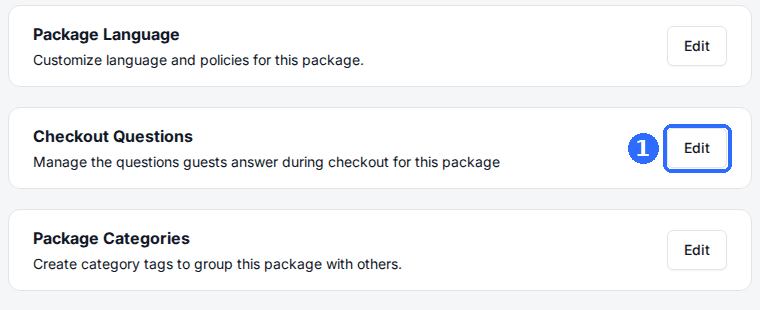
Open Manage, then Venues, and click your venue. Open the Packages tab and click the package, then scroll to the Checkout Questions card and click Edit to open the Checkout Questions window.
Select the preset fields you want
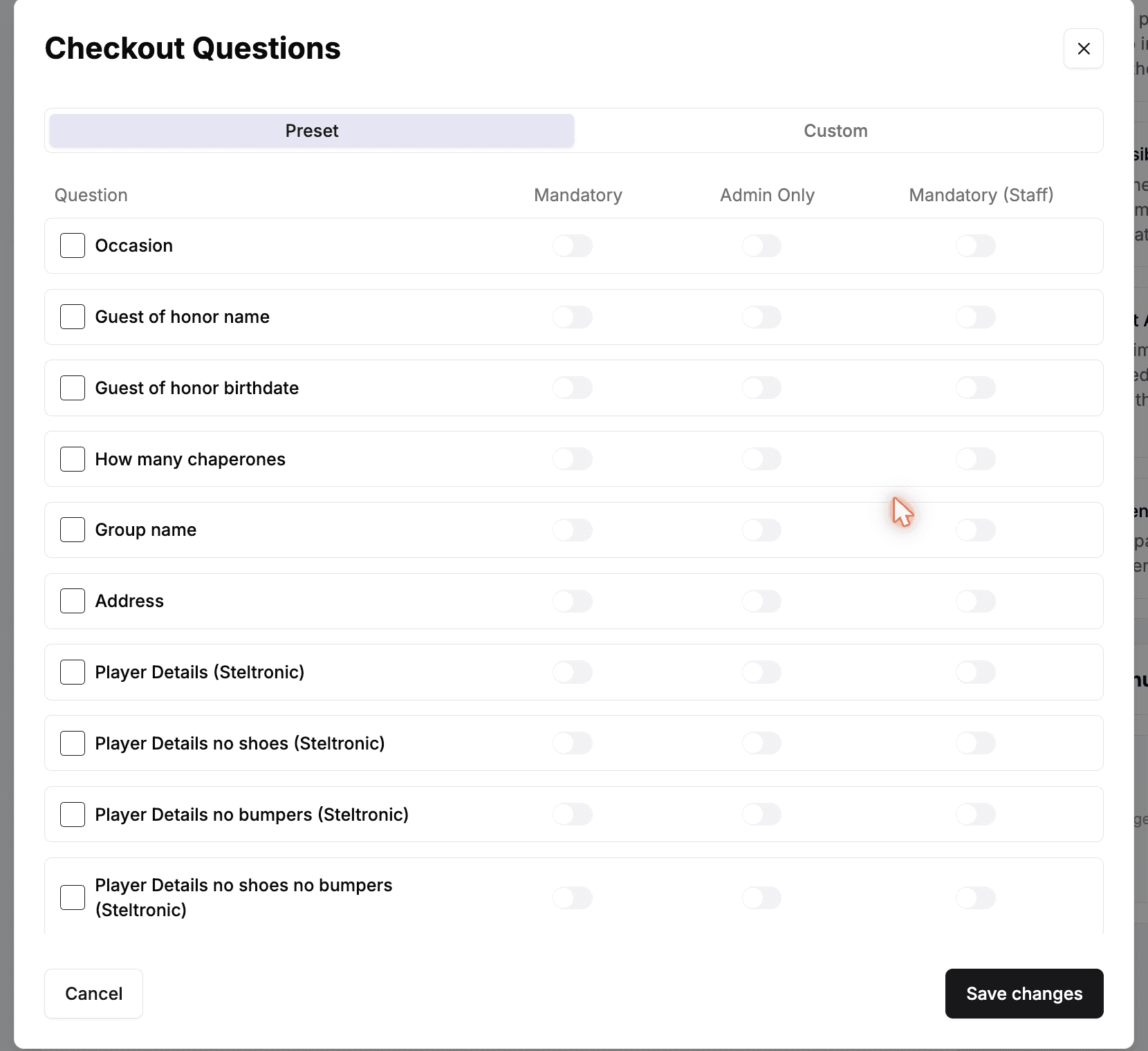
The modal opens on the Preset tab. Check the box next to each ready-made field you want this package to collect.
Set who answers each one
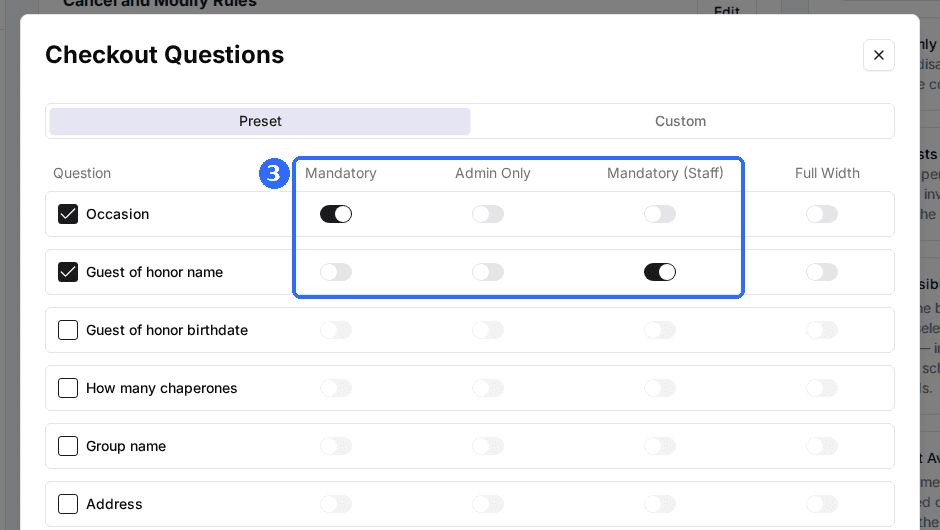
For each checked field, use the Mandatory, Admin Only, and Mandatory (Staff) toggles to control who has to answer it and who can see it (see the table below).
Save the package
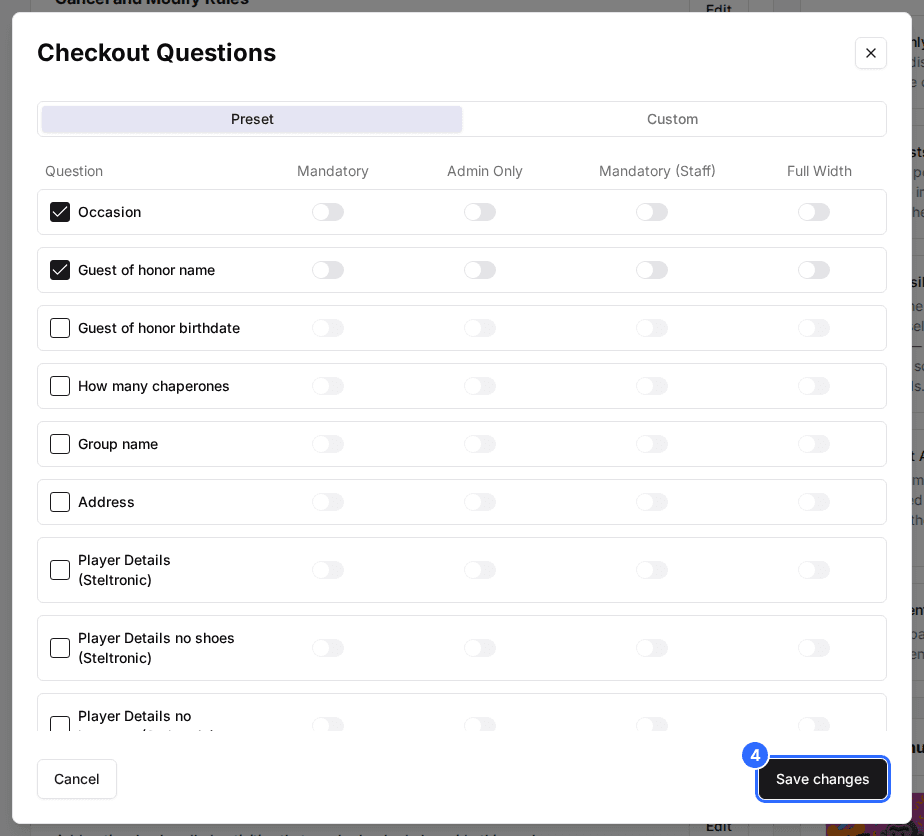
Click Save changes. The selected fields now appear in this package's booking flow.
Create your own custom question
Custom questions are built once in the Questions builder and then reused across any package.
Open the Questions builder
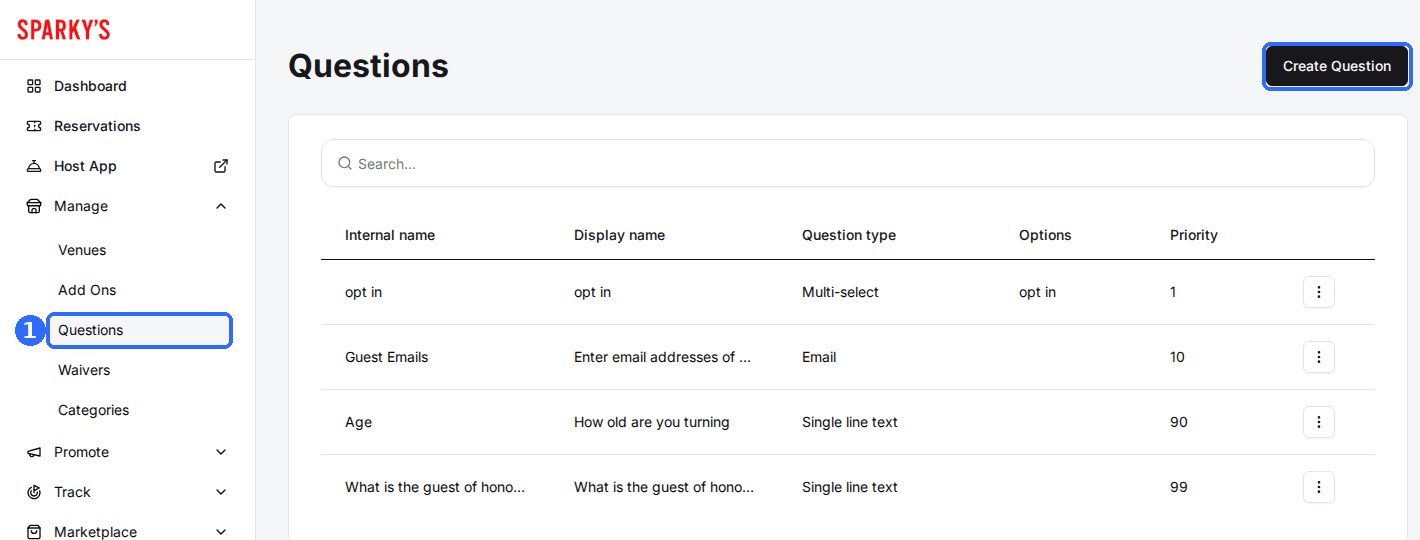
In the left sidebar, open Manage and click Questions, then click Create Question.
Enter the question details
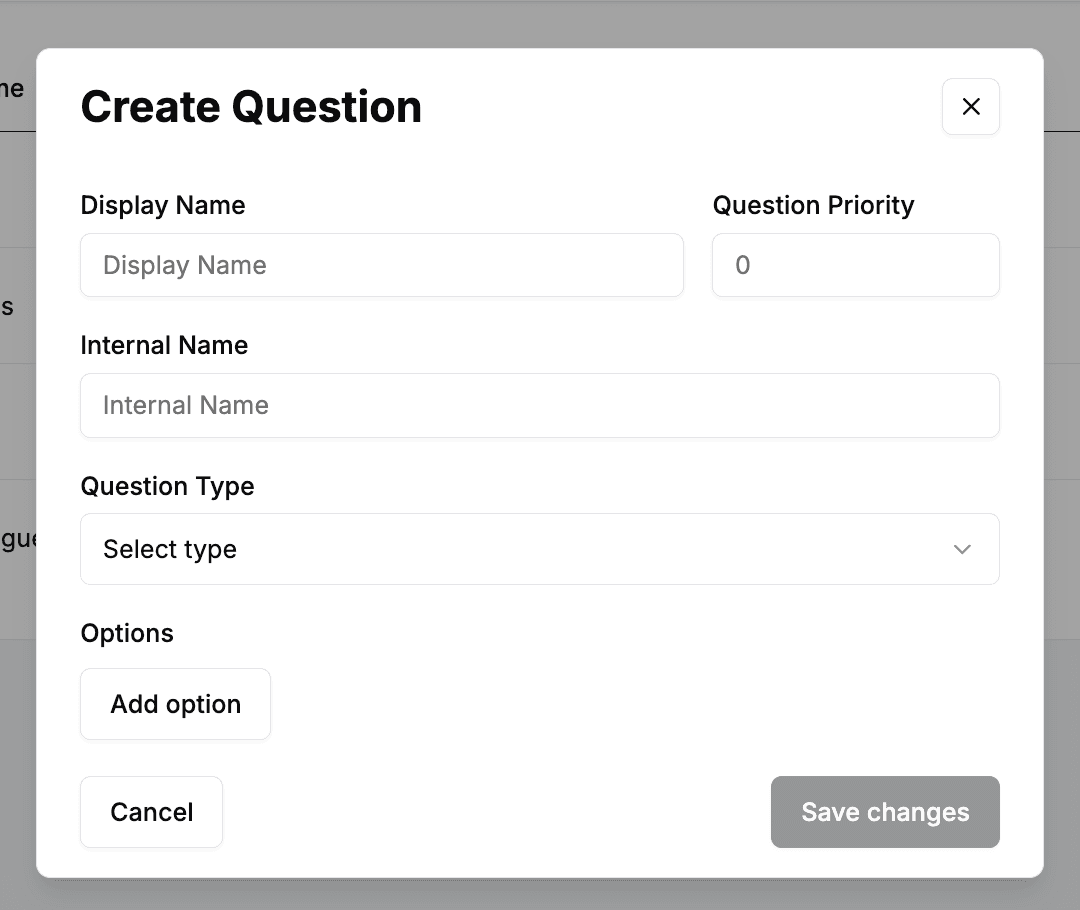
Fill in the fields below, then pick a Question Type that matches the answer you want.
| Field | Description |
|---|---|
| Display Name | The question text guests see at checkout, e.g. "Any dietary restrictions?" |
| Internal Name | A short reference name for your team. Not shown to guests. |
| Question Priority | Controls the order questions appear in. Higher numbers show first. |
| Question Type | The answer format — see the types below. |
| Options | For Dropdown and Multiselect, the choices guests pick from. Click Add option for each one. |
| Include on Confirmation emails | For Email questions, adds the answer to the guest's confirmation email. |
The question types available:
| Field | Description |
|---|---|
| Single line text | A free-form short answer — names, a company, a quick note. |
| Dropdown | The guest picks one option from a list you define. |
| Multiselect | The guest can pick more than one option from a list you define. |
| Date (MM/DD/YY) | A full date including the year, e.g. a guest of honor's birthdate. |
| Date (MM/DD) | A month-and-day date with no year. |
| An email address. Can be added to the confirmation email. |
Save the question
Click Save changes. The question is now available to add to any package from the Custom tab of its Checkout Questions modal.
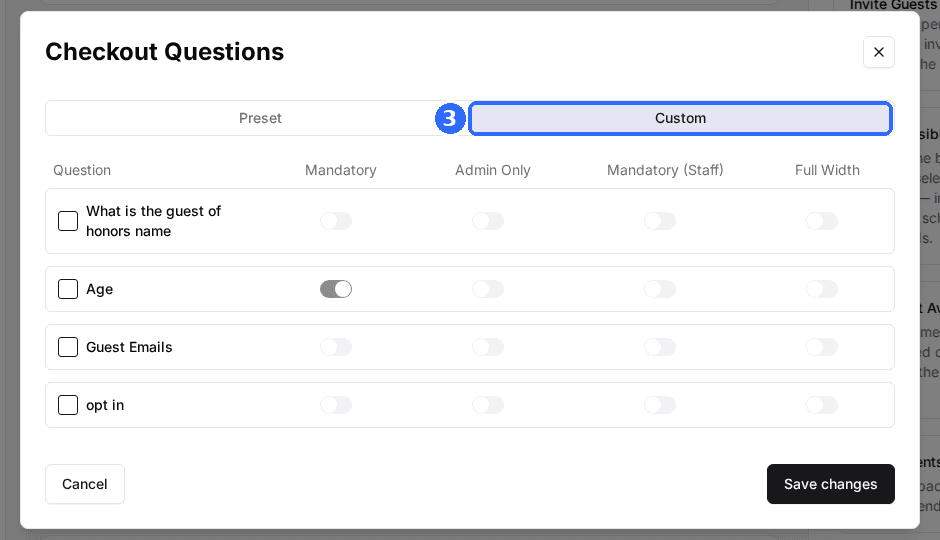
A custom question isn't live until you add it to a package. Open the package's Checkout Questions card, switch to the Custom tab, and check the question on — just like a preset.
Choose who answers each question
Every question you switch on — preset or custom — has three toggles in the Checkout Questions modal that decide who answers it and where it shows up.
| Field | Description |
|---|---|
| Mandatory | The guest must answer this question before they can finish checkout. Leave it off to make the question optional. |
| Admin Only | Hides the question from guests entirely. Only your staff see and answer it, in the Host App. Use it for internal notes and special requests. |
| Mandatory (Staff) | Requires your staff to answer the question when creating or checking in the reservation. |
Where questions appear
- For guests — guest-facing questions show up in the Additional Info section at checkout on your reservation page.
- For staff — Admin Only questions appear in the Host App when staff create or check in a reservation.
- On emails — answers to Email questions can be included on the guest's confirmation email.
After setting questions up, run through your own reservation page to confirm guest-facing questions appear at checkout and Admin Only ones stay hidden.
Updated Oct 8, 2026
Was this helpful?