
Manage your Rex billing and plan
Everything about your Rex subscription lives on the Billing & Plan page: the plans you can move to, your current plan, your payment method and billing email, and your invoices.
Billing & Plan only appears for users with the Billing Manager switch turned on, and only when your account has a Rex subscription. Global Admins have Billing Manager on by default, and a Global Admin can turn it on for other users under Settings › Users.
Open Billing & Plan
In the sidebar, open Settings and click Billing & Plan. If your account has more than one subscription, choose the one you want in Select Subscription at the top of the page.
Review your billing information
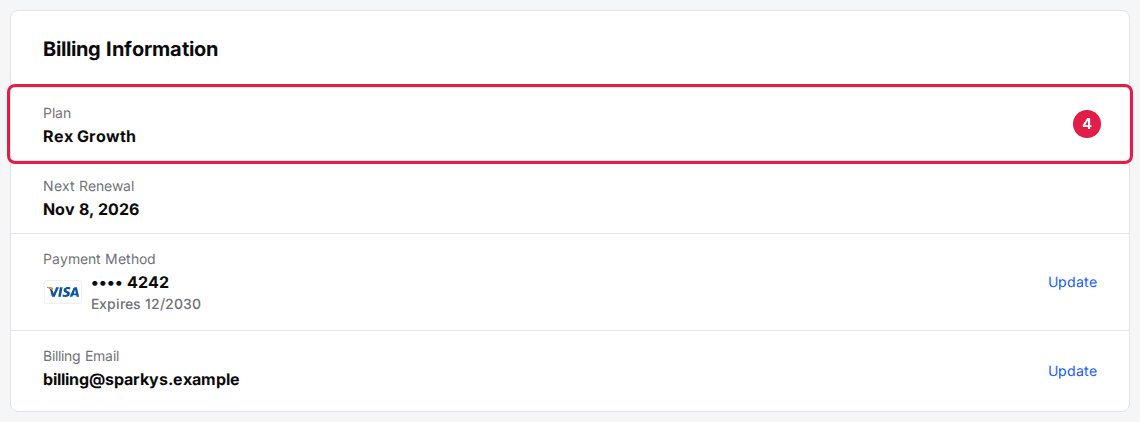
The Billing Information section at the bottom of the page shows your subscription at a glance:
| Field | Description |
|---|---|
| Plan | Your current plan. |
| Next Renewal | The date your subscription renews and bills next. |
| Payment Method | The card on file, with its last four digits and expiry date. |
| Billing Email | Where Rex sends billing emails and receipts. |
Click Update next to Payment Method or Billing Email to change it. Rex's billing portal opens in a new tab. View Invoices at the top of the page opens the same portal, where you can see and download past invoices.
If an invoice is unpaid, Rex blocks the rest of the dashboard and shows "Your account is temporarily blocked because of outstanding payments." on this page. Billing & Plan stays open: use the Make a payment link in that message to pay the invoice and unlock your account.
Compare plans
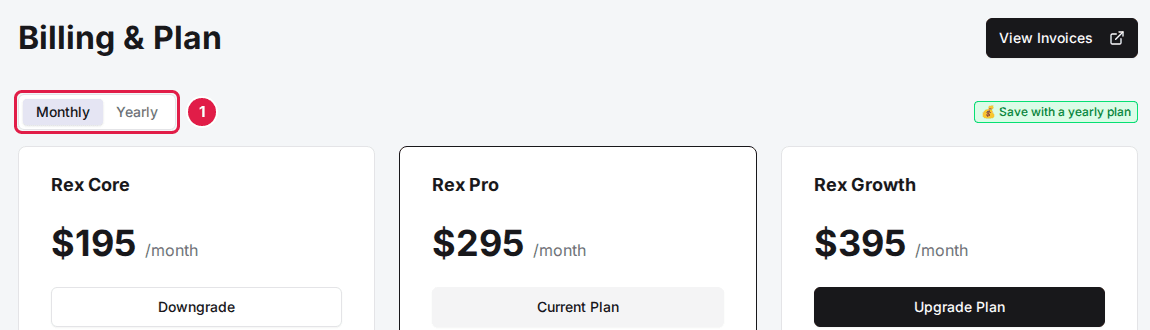
The plan cards show each plan's price, its button, and a What's included list of the features it unlocks. Use the Monthly and Yearly tabs above the cards to compare prices for each billing cycle. The plans, from entry level up:
Rex Core
The entry plan. Includes Add Ons and integrations such as Memberships, Reserve with Google and Mailchimp.
Best for: A venue that sells straightforward bookings.
Rex Pro
Adds Multi Activity, Questions, Revenue Tracking, Additional Guests and Resource Combos, plus integrations including Gift Cards, Waivers, Texting, Square, GoTab and Tripleseat.
Best for: A venue that sells parties, extras and gift cards.
Rex Growth
Adds Marketing, Feedback, Events Calendar, Waitlist, Links, API, Resource Schedules, Resource Selection, Section Time Slots, Inventory Drip, Membership Splits and Dynamic Pricing.
Best for: A busy venue that wants marketing and advanced inventory tools.
Rex Enterprise
Custom integrations, custom gift card options, a sandbox account and a custom domain. Priced individually: use Contact Us on the Upgrade to Enterprise banner.
Best for: Multi-location groups with custom needs.
When you try to use a feature your plan doesn't include, Rex shows an Upgrade Plan button (or one that names the plan you need). For a Billing Manager it opens Billing & Plan with the upgrade confirmation for the lowest plan that includes the feature. Other users see the button disabled with "Contact admin that has billing plan permissions."
Upgrade your plan
Each card's button shows where that plan stands: Current Plan on your plan, Upgrade Plan on a higher plan, and Downgrade on a lower one.
Select Monthly or Yearly
Pick the billing cycle you want above the plan cards.
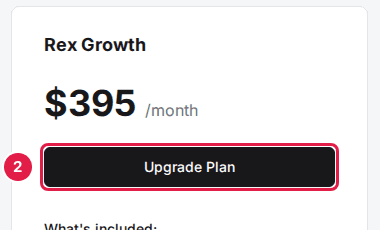
Click Upgrade Plan
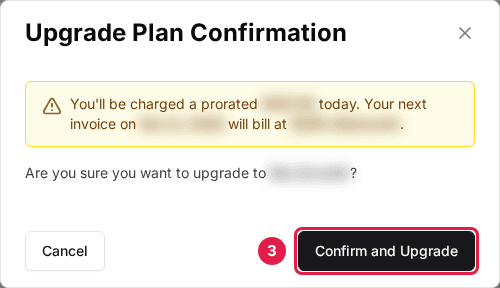
Click it on the plan you want. The Upgrade Plan Confirmation window shows the prorated amount charged today and what your next invoice will be.
Click Confirm and Upgrade
The change takes effect right away.
Verify your plan
Check that Plan under Billing Information shows your new plan.
To change only the billing cycle, open the other tab and click Switch to Yearly (or Switch to Monthly) on your current plan's card, then confirm. Moving to yearly shows the amount charged today, less any credit for the unused time on your current plan.
Downgrades aren't self-serve, because your account may use features the lower plan doesn't include. Clicking Downgrade shows a Downgrade Not Available message: click Contact Support to email the Rex team, who will handle the change with you.
Updated Oct 8, 2026
Was this helpful?