
Export reports as CSV
Rex can export your reservation, revenue, tax, and discount data as CSV files for accounting, tax filing, payment reconciliation, or analysis in a spreadsheet. There are five exports, all generated from the Reports page, and each pulls a different slice of the same underlying reservations.
Every export uses the filters currently set on the Reports dashboard — the time period, venue, and date mode. Set those first so the file contains exactly the reservations you want; see View and filter reports for what each filter does.
The exports are not the same as the metric cards on the dashboard. The cards (Revenue Booked, Taxes Collected, and so on) are on-screen summaries and can't be downloaded. The five exports below are separate, reservation-level CSV files — each one lists the individual reservations behind your numbers. The Export button is available on every Reports tab except Memberships.
Pull an export
Open Reports and set your filters
Set the time period, venue, and date mode to match the data you want. The export applies whatever filters are currently active on the dashboard.
Click Export
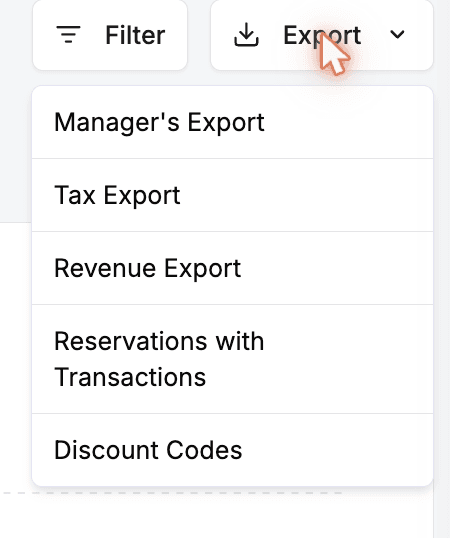
Click the Export button in the top-right of the Reports page. A dropdown opens with the five export types.
Choose the export type
Click the export that matches what you need (see what each one contains below). The CSV file downloads automatically to your browser's download folder.
What each export contains
All five are CSV files covering the reservations in your selected period. They differ in which columns they include and how rows are grouped.
Manager's Export
The most complete export: every reservation in the period with its full guest and financial detail, one row per reservation. This is the best starting point for general bookkeeping or analysis.
| Field | Description |
|---|---|
| Reservation details | Reservation Number, Reservation Date, Start Time, Venue, First Name, Last Name, Number of Guests, Number of Lanes, Phone Number, Package Name, Occasion, Source, Created Date, Notes, and Status. |
| Payment & discounts | Payment method, Discount, and Add-On Items. |
| Financial breakdown | Base Price, Additional Activities, Add Ons, Subtotal, Fees, Discounts, Comps, Tax, Net Revenue, Grand Total, Deposit Paid, Total Paid, Refunds, and Balance Due. |
| Your custom columns | A column for each custom checkout question you collect, plus a column for each age group (for example 0–3, 4–8) so guest counts break out by tier. |
Tax Export
A tax-focused view of each reservation — the headline totals plus a separate column for every tax you charge, so you can see how each tax adds up across the period.
| Field | Description |
|---|---|
| Reservation | Res Number, Res Date, Venue, First Name, Last Name, Number of Guests, Number of Lanes, and Package Name. |
| Totals | Balance Due, Deposit Paid, Total Deposit, Refund, Managers Comp, Gross Total, Net Revenue, Tax, Service Fee, Modification Fee, and Custom Fees. |
| One column per tax | A separate column for each tax name you've set up (for example State Sales Tax, City Tax), with that tax's amount per reservation. |
Revenue Export
The same reservation rows and totals as the Tax export, but broken out by your revenue categories instead of taxes — useful for splitting income across lines like food, rentals, or events.
| Field | Description |
|---|---|
| Reservation & totals | The same reservation columns and totals as the Tax Export (Res Number through Custom Fees). |
| One column per revenue category | A column for each revenue category defined in your settings (for example Food & Beverage, Lane Rental), with that category's revenue per reservation. |
Reservations with Transactions
One row per payment or refund rather than per reservation — so a booking paid in three installments shows up as three rows. Use this to reconcile against your payment processor.
| Field | Description |
|---|---|
| Reservation | Number, date, time, duration, people, lanes, venue, first and last name, client email, guest email, opt-in, phone, occasion, guest details, and custom fields. |
| Amounts | Price, discount, tax, service fee, add-ons price (when present), deposit, and amount due. |
| Transaction | Transaction type (charge or refund), transaction ID, transaction amount, created date, and status. |
Discount Codes
Performance of every discount code over the period — how often each was used and its revenue impact. Deleted codes are excluded.
| Field | Description |
|---|---|
| Discount Name | The internal name of the discount. |
| Coupon Code | The code guests enter at checkout. |
| Type | Percent or Fixed. |
| Discount Value | The percentage or fixed amount the code takes off. |
| Valid From / Valid To | The date range the code is active. |
| Status | Active, Inactive, or Deleted. |
| Times Used | How many reservations applied the code. |
| Unique Customers | How many distinct customers used it. |
| Total Discount Given | The total amount discounted across all uses. |
| Total Revenue | Revenue from reservations that used the code. |
| Avg Order Value | Average reservation total among uses of the code. |
Other ways to get this data
For a quick grab of just the Manager's Export, you can also click Export on the Reservations page — it downloads the same reservation CSV for the reservations currently in view. The tax, revenue, transaction, and discount exports live only on the Reports page. To deliver these reports automatically on a daily schedule, Rex can push the Manager's, Tax, Revenue, and Reservations-with-Transactions reports to an SFTP server — see Set up the SFTP integration.
Updated Jun 24, 2026
Was this helpful?