
Configure package pricing
A package's price comes from two settings that work together. The pricing method decides how a rate is read: per person, per lane, per hour, or a flat fee. The rates are the dollar amounts, and you enter those on each time slot when you build the schedule.
This article covers the pricing method and the other pricing controls. For building time slots and entering rates, see Set up your schedule and pricing.
Set the pricing method
Open the package
Click your venue, open the Packages tab, and click the package you're pricing.
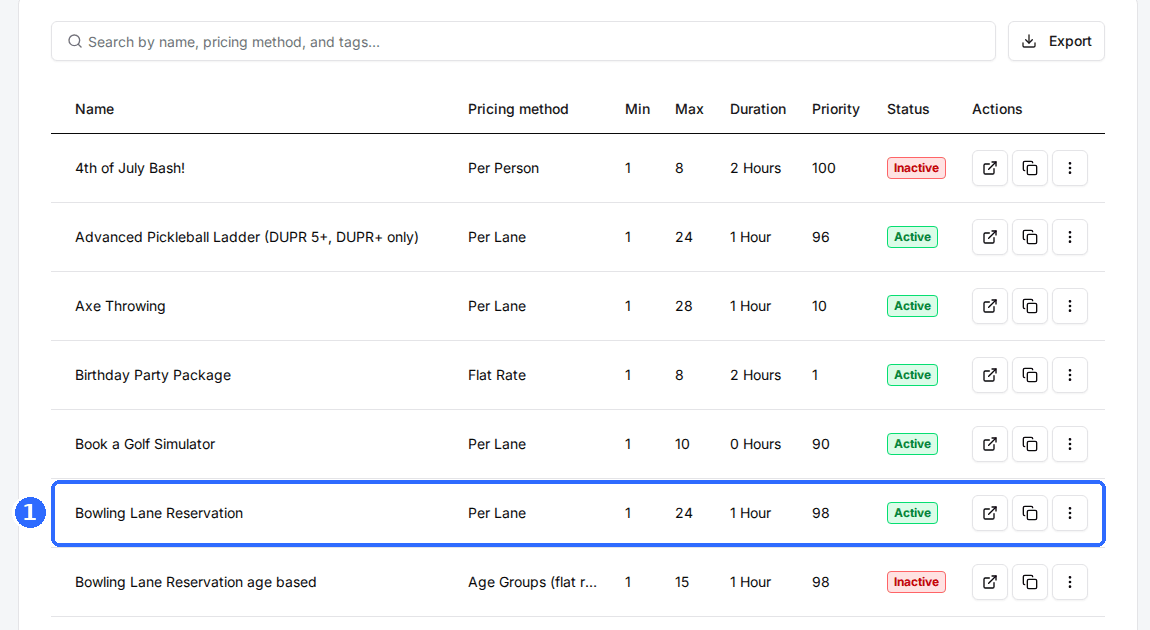
Open Package Settings
Click Edit on the Package Settings card to open the Package Settings window.
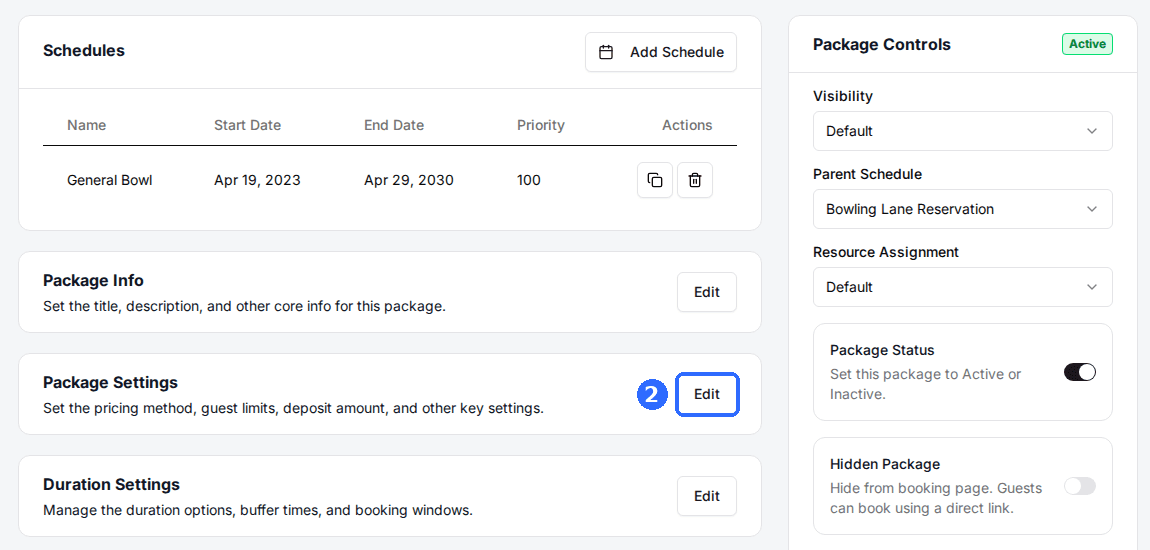
Select a Pricing Method
Pick a method from the Pricing Method dropdown and click Save changes. It decides how the Rate on each time slot is charged, so set it before you enter rates. You can also pick it when you first create the package.
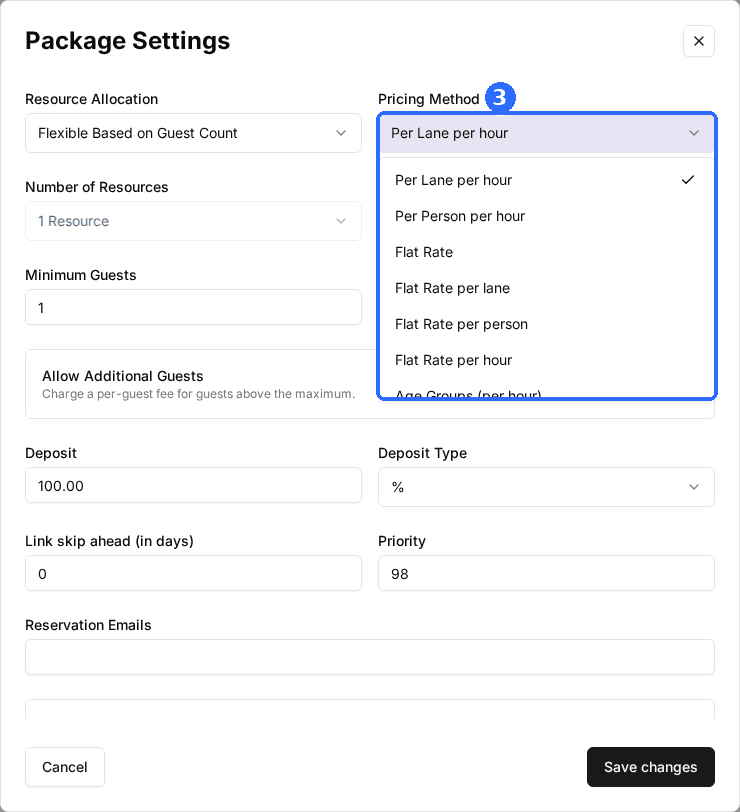
Pricing methods
There are eight methods. The first three are the most common; the rest are variations for venues that charge a flat fee in some way.
| Field | Description |
|---|---|
| Per Lane per hour | Rate × resources × hours. At $30 per lane per hour, two lanes for two hours = $120. |
| Per Person per hour | Rate × guests × hours. At $12 per person per hour, eight guests for 1.5 hours = $144. |
| Flat Rate | One fixed price per reservation, no matter the party size or length. Good for a $199 birthday package. |
| Flat Rate per lane | Fixed price × resources. $75 per lane × 3 lanes = $225. |
| Flat Rate per person | Fixed price × guests. $25 per person × 10 guests = $250. |
| Flat Rate per hour | Fixed price × hours. $50 per hour × 3 hours = $150. |
| Age Groups (per hour) | A separate per-hour rate for each age group. |
| Age Groups (flat rate) | A separate flat rate for each age group. |
The two Age Groups methods charge different prices by guest type, such as Child, Adult, and Senior. To set them up, see Set different prices by guest type.
You can change the pricing method after a package is live. The rates already on your time slots stay as they are and are charged under the new method, so re-check them after switching.
Charge different rates at different times
The Rate is set per time slot, not once for the whole package. That's how you charge more at peak times. Say a bowling package is Per Lane per hour: weekday afternoon slots can be $30 and Friday and Saturday evening slots $40. A lane booked at 2 PM bills at the afternoon rate; the same lane at 8 PM bills at the evening rate.
Slot-Based Pricing
When a booking spans more than one hour, the whole booking uses the rate of its start time by default. Turn on Slot-Based Pricing in the Schedule window to bill each hour at its own slot's rate instead.
Take a two-hour Per Lane per hour booking of one lane that starts at 3 PM, where the 3 PM slot is $30 and the 4 PM slot is $40:
| Field | Description |
|---|---|
| Slot-Based Pricing off (default) | Both hours bill at the 3 PM start rate: $30 × 2 hours = $60. |
| Slot-Based Pricing on | Each hour bills at its own rate: $30 + $40 = $70. |
Slot-Based Pricing only changes the per-hour methods: Per Lane per hour, Per Person per hour, and Flat Rate per hour.
Charge by booking length
When guests choose how long to book, you can give each length its own rate. In the Duration Settings card, with Duration Mode set to Guest Chooses Duration, switch on Assign Rate by Duration. Each slot's Rate in the schedule then shows Edit, which opens a Rate per hour for each duration the package offers.
Each rate covers its part of the booking, not the whole booking. With a 1-hour rate of $50 and a 2-hour rate of $40, one hour costs $50 and two hours cost $50 + $40 = $90. Duration rates replace Slot-Based Pricing on that package.
Charge by section
If your resources are grouped into sections on the Floor Plan, you can price each section separately. In the Assign Resource Category window, switch on Show Times by Section, choose the sections under Allow guests to choose section, and switch on Price by Section. Each slot's Rate then opens a Section Pricing window with a rate for each section. Duration rates aren't used while section pricing is on, and age group rates still come first.
Dynamic Pricing
Dynamic Pricing in the Schedule window raises rates automatically as a time slot fills up, following a curve generated from your booking history. Its Weight % sets the most a price can rise above the day's lowest rate. It isn't available on Age Groups methods or with section pricing, and depending on your plan the switch may show an upgrade button instead.
Other pricing settings
The rest of the pricing controls live in the Package Settings window:
| Field | Description |
|---|---|
| Allow Additional Guests | Charge a per-guest fee for guests above Maximum Guests. Set Max Additional Guests and Price per Additional Guest. Depending on your plan, this may show an upgrade button. |
| Deposit | The amount collected at checkout. |
| Deposit Type | Whether the Deposit is a percentage of the total or a flat dollar amount. |
| Hide Price | Hides the price on the package card on your booking page. |
| Hide Price on Time Slot | Hides the price shown on each time slot. |
| Hide Deposit Line Item | Hides the deposit as a separate line item at checkout. |
| Allow Only One Discount Per Reservation | Limits a reservation to a single discount code. |
| Show “Free” for $0 Packages | Shows Free on the package card when the price is zero. |
| Require Purchase Minimum | Requires guests to spend at least the amount you enter. |
| Show Full Price on Time Slot | Shows the calculated total on each time slot instead of the per-unit rate. |
To show a sale price next to a crossed-out original, turn on Feature Discount Price in the Schedule window; see Strikethrough pricing.
Updated Oct 8, 2026
Was this helpful?